🎲 How to Use an Online Dice Roller for Games
By The Wheel of Name Team ·
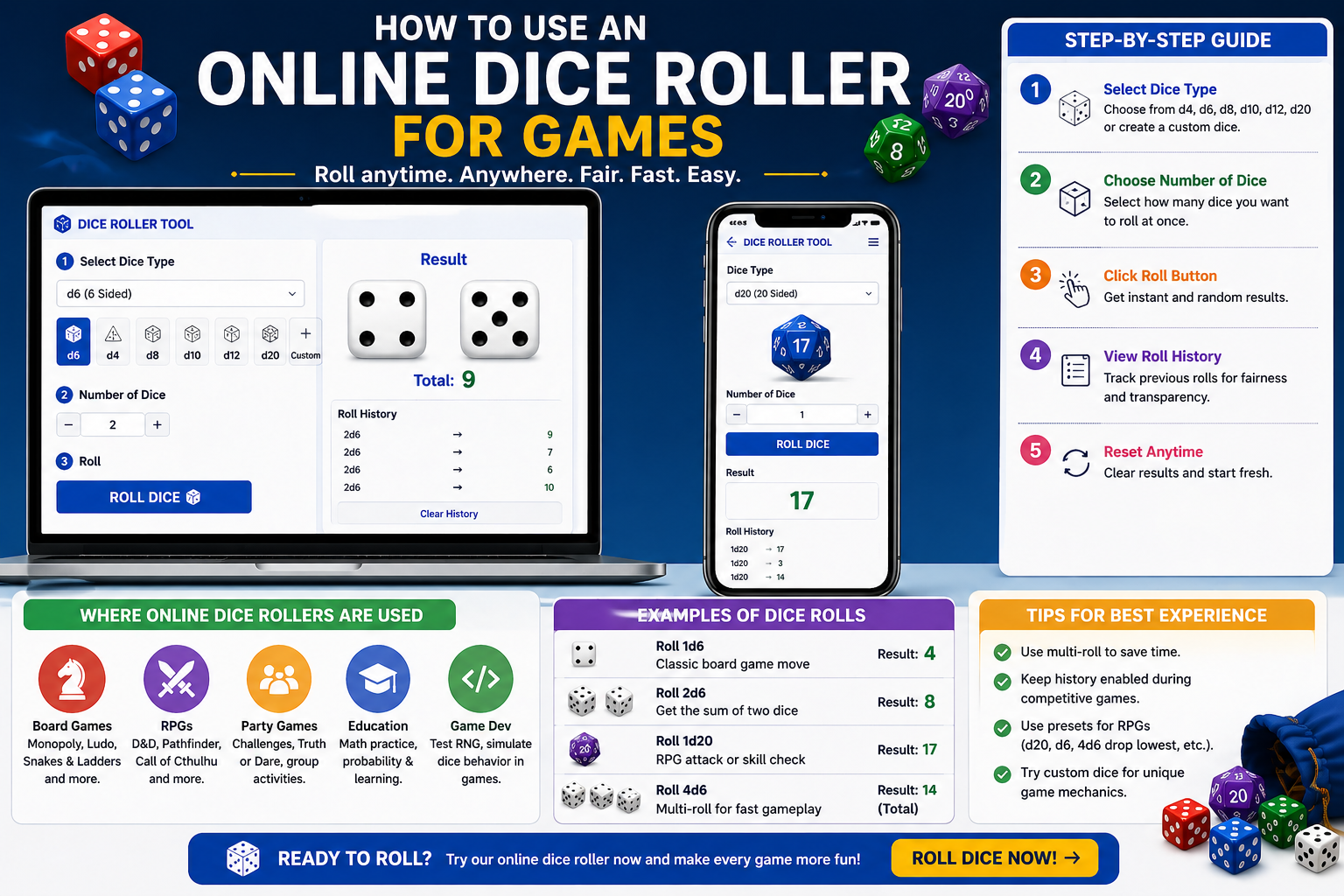
An online dice roller is a powerful digital tool that replaces physical dice and makes gameplay faster, fairer, and more convenient. Whether you're playing board games, RPGs, classroom activities, or party games, a dice roller provides instant and unbiased results.
🎯 Why Use an Online Dice Roller?
- 📱 Works on mobile, tablet, and desktop devices
- ⚡ Roll multiple dice instantly without manual effort
- 🎮 Supports custom dice like d4, d6, d20, or even 1–100
- 🏆 Provides fair and random results every time
- 📊 Tracks roll history for transparency
🧠 Step-by-Step: How to Use It
1. Select Dice Type
Choose standard dice (d6, d20) or create a custom dice range.
2. Choose Number of Dice
Roll one or multiple dice depending on your game.
3. Click Roll
The tool instantly generates a random result.
4. Analyze Results
Use results for gameplay, decisions, or probability experiments.
5. Repeat or Reset
Quickly roll again or clear results.
🎮 Where You Can Use Dice Rollers
- 🧩 Board Games – Monopoly, Ludo, Snakes & Ladders
- ⚔️ RPGs – Dungeons & Dragons (D&D), Pathfinder
- 🎉 Party Games – Truth or Dare, challenges
- 📚 Education – Math and probability learning
- 💻 Development – Testing random logic (RNG)
📌 Real Examples
- 🎲 Roll 1d6 → Classic board game move
- 🎯 Roll 2d6 → Generate sum outcomes
- 📘 Roll d20 → RPG decisions
- 🔥 Roll 4 dice → Fast gameplay in groups
💡 Pro Tips for Better Gameplay
- Use multi-roll to save time
- Enable history for competitive games
- Use preset dice for RPGs
- Try custom dice for experiments
❓ Frequently Asked Questions
- Is an online dice roller fair? Yes, it uses random algorithms for unbiased results.
- Can I roll multiple dice? Yes, you can roll multiple dice instantly.
- Is it better than physical dice? For speed and convenience, yes.
Why More Game Groups Are Going Digital for Dice
Five years ago, suggesting that a tabletop group replace their physical dice with an online tool would have been met with skepticism. Today, half the tabletop gaming community rolls digitally at least some of the time — and the shift isn't just about remote play. Even groups that meet in person are opening dice rollers on a laptop or phone when they need speed, variety, or large quantities.
The reason is practical. If you're the dungeon master and four monsters each need to roll 3d8 damage simultaneously, that's twelve dice you either don't have, have to roll in sequence, or need someone else to manage. An online roller handles it in a click. The number appears. The game continues.
The Games That Benefit Most
Not every game benefits equally from switching to digital dice. Games with simple, infrequent rolls — Snakes and Ladders, basic Yahtzee, Ludo — are fine with physical dice because you're only rolling a few times per turn and the dice are always d6s. The switch makes the biggest difference in games with high dice variety or high dice count.
Dungeons and Dragons benefits enormously because the game uses seven different die types and some actions call for rolling ten or more dice at once. Warhammer and similar wargames involve massive dice pools where counting results from 25 physical dice is slower and more error-prone than a digital roll. Shadowrun players routinely need 15 or more d6s for a single action — a quantity most people don't own in physical form.
Board Games vs. Roleplaying Games
Board games and roleplaying games have different dice relationships. Board games tend to use dice as resolution tools — roll and move, or roll to see if an attack hits. The dice result is often the whole event. Physical dice work well here because the rolling is part of the experience, and you don't need complex configurations.
Roleplaying games, especially crunchy systems, use dice as the mechanical foundation of an entire session. You might roll 50 to 100 times in a four-hour D&D session. At that frequency, the ergonomics matter. A fast, reliable digital roller saves real time and reduces friction, letting players stay in the story rather than hunting for dice that rolled under the table.
Setting Up for Different Game Systems
Our dice roller lets you configure exactly the combination you need for your game. For D&D 5e, you'll mostly use d20 for checks and attacks, with damage dice varying by weapon — d4 for daggers, d6 for short swords, d8 for long swords, d12 for greataxes. Advantage rolls use 2d20 and take the higher. For a Paladin using Divine Smite on a hit, you'd roll weapon damage plus 2d8 or more.
For Pathfinder, the system is similar but the modifiers stack differently. For Shadowrun, you'll set up a large pool of d6s and count any result of 5 or 6 as a success. For Warhammer Fantasy Roleplay, you're rolling d100 (percentile) and comparing against a skill score. Every system has its own dice language, and our roller handles all of them without requiring any physical setup or hunting for the right die type.
Fairness and Transparency in Group Play
One practical advantage of an online roller that doesn't get enough attention: everyone sees the same result. In person, a physical roll can be bumped, fall off the table, or land on uneven ground where it's hard to read. Online, the result appears on screen clearly and instantly.
For remote play over Discord or a video call, this matters even more. You can't verify a physical roll someone makes in their own home. A shared online roller gives everyone in the session the same number, generated by the same algorithm, at the same time. There's no ambiguity and no need to trust that someone reported their roll honestly.
⬅ Back to BlogsShare this wheel:
I just used this fun wheel on thewheelofname.com 🎡 Try it!.